How I Deploy Laravel and Next.js to a VPS: FastPanel, GitHub Actions and Zero-Downtime Releases
The setup behind my client apps: a VPS from Hetzner or netcup, FastPanel to host several sites on one server, and GitHub Actions deploys with a releases folder, shared files and an atomic switch, for Laravel (with Vue or React) and Next.js.
Most of the apps I build and look after don't run on a platform that bills per app. They run on a few VPSs I manage myself, several sites per server, deployed by GitHub Actions. It costs a fraction of a managed plan per app, and in exchange I own the server: updates, backups and the deploy pipeline are my job.
This post is that setup, end to end: how I pick a VPS provider, how FASTPANEL turns one server into a small hosting platform, and the deploy pipeline that ships Laravel and Next.js apps without a second of downtime.
Picking a VPS provider
The cheapest VPS isn't the one that costs least per month. It's the one you don't have to think about. What I look for, in order:
- Reliability. Stable network, few unplanned reboots, and support that answers when something does break.
- Location. Data centers in Europe, close to both my European clients and Algeria.
- Snapshots and backups from the provider's dashboard, so a bad upgrade is a restore, not a rebuild.
- Honest resources. The CPU and disk you pay for, not a number shared with too many neighbours.
The two I recommend are Hetzner and netcup. I've been a netcup client for almost two years now, and it's where most of my servers run. Before that I used Contabo. It's hard to beat on price, but in my experience it's less reliable, so I'd only put things there that are allowed to go down.
Prices change often, so I won't quote them. Compare the plans on each provider's site at the size you need.
FASTPANEL: one server, many sites
A bare VPS gives you SSH and nothing else. You could set up nginx, PHP-FPM, databases, SSL and users by hand for every site, and keep them all updated. Or you can put a control panel on top. I use FASTPANEL: it's light, it runs on Debian, Ubuntu, AlmaLinux and Rocky Linux, and it does what I need without getting in the way.
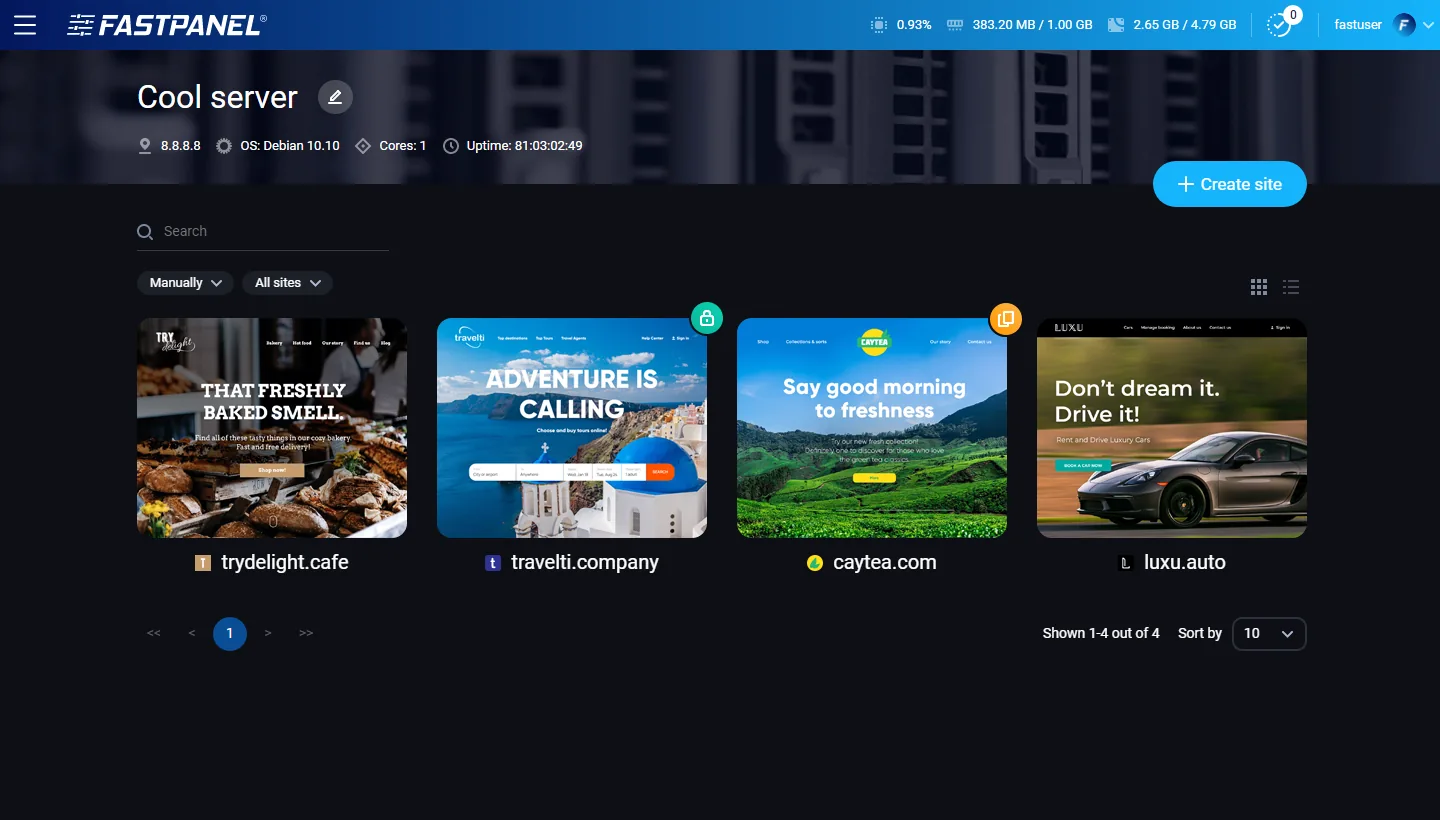
What I use it for:
- Many sites on one VPS. Each site gets its own folder,
/var/www/<user>/data/www/<domain>, its own system user if you want one, and its own settings. - A PHP version per site. PHP 5.3 to 8.5 can be installed side by side from the Applications menu, so an old Laravel 8 app and a new Laravel 13 app live on the same server, each on its own version. That's what makes upgrading old apps one at a time possible.
- Databases with a web admin. MySQL and PostgreSQL (9.6 to 17), with phpMyAdmin and phpPgAdmin installed from the same menu. If you prefer the pgAdmin desktop app, connect it to PostgreSQL through an SSH tunnel.
- The rest of the stack. Redis, Memcached, Composer, Git and Fail2ban, a scheduler for cron jobs, and SSL certificates from each site's card.
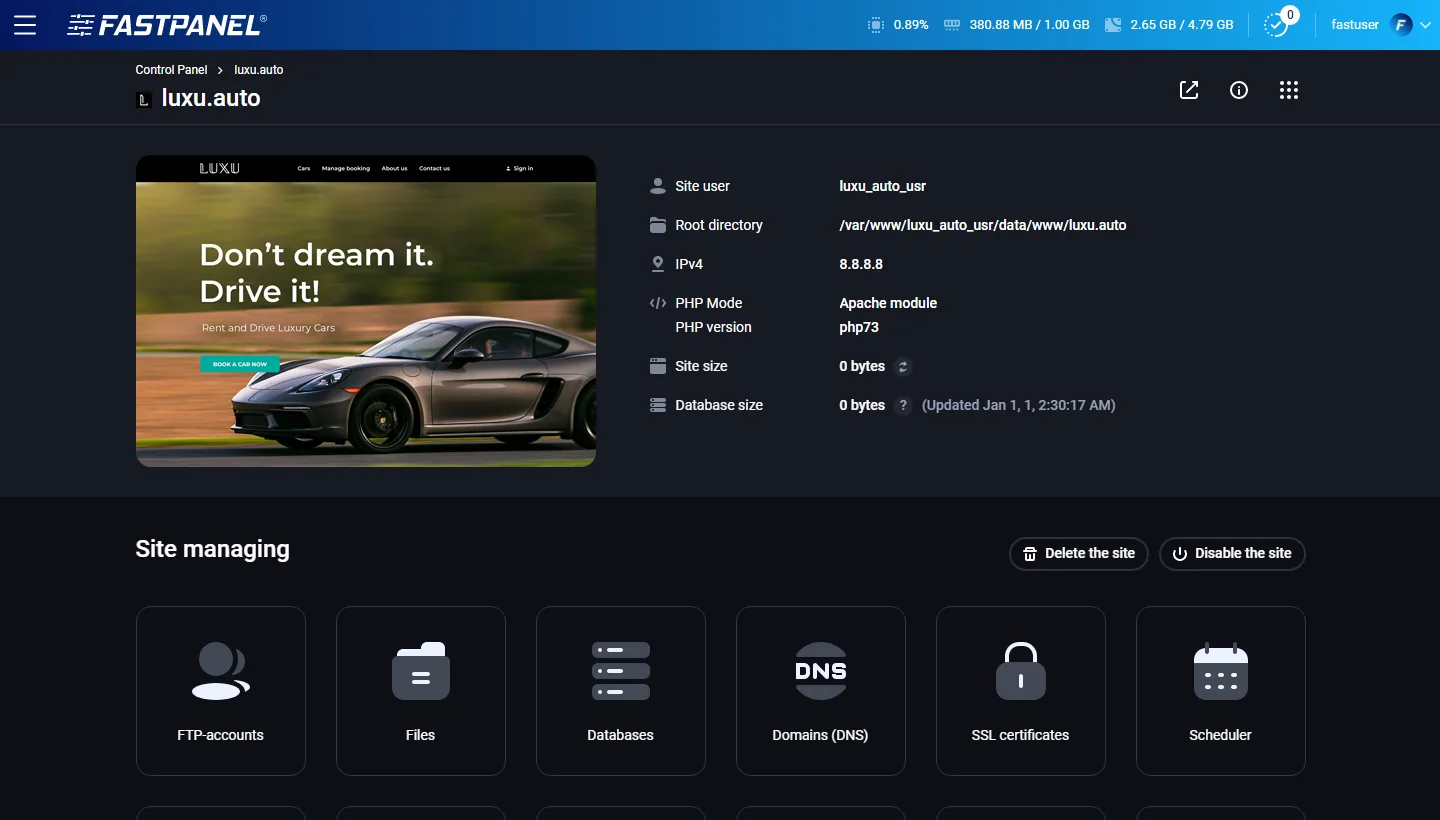
FASTPANEL comes as a Standard and an Extended license. Installing Node.js from the panel is an Extended feature. I install Node myself with nvm, per user, which also lets each app pin its own Node version with an .nvmrc file. Check the current license terms before you pick one.
Node, Python and anything else that listens on a port
A Next.js server, a Python API or a websocket service isn't served by PHP. It listens on a local port, and the site in front of it forwards requests there. In FASTPANEL, open the site's Settings, choose Reverse proxy under Backend (PHP, Reverse proxy, etc.) and enter the app's address, for example http://127.0.0.1:3000. The panel keeps handling the domain, SSL and static files; your app only answers on its port. You can also list several addresses, and requests are balanced between them.
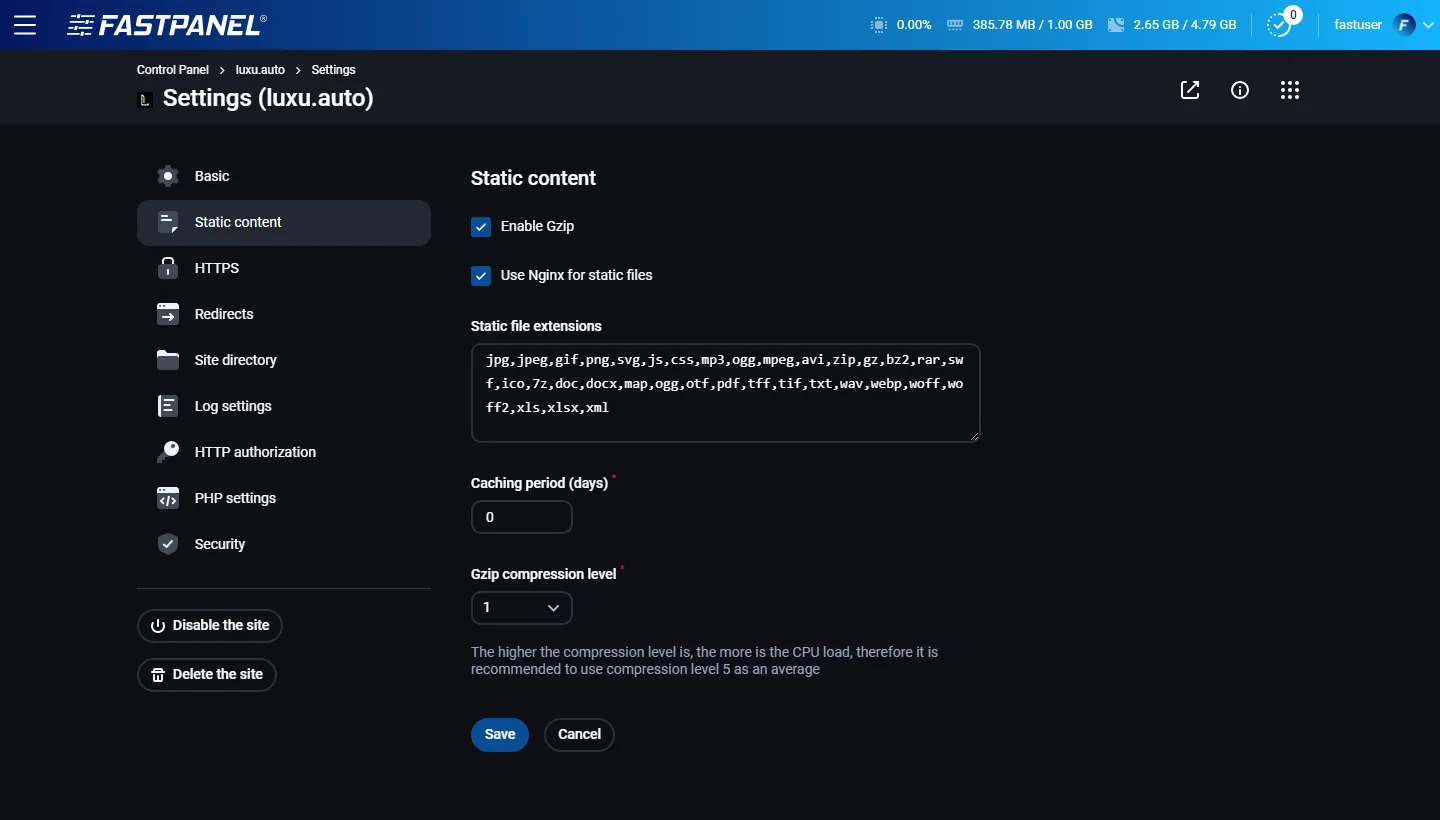
More on each setting in the FASTPANEL knowledge base.
Zero downtime: releases, shared files and one symlink
The classic deploy is git pull inside the live folder, then composer install and a build. For a minute or two, visitors hit a half-updated app: new code with old dependencies, or a build that isn't finished. If the build fails, the site stays broken until someone fixes it.
The fix is to never touch the live folder. Every deploy goes into a new folder, and the site is switched to it only when it's ready:
example.com/
├── current -> releases/20261024-71e5b3d   # what the web server serves
├── releases/
│   ├── 20261020-8b1d4e7
│   ├── 20261022-c4a90f2
│   └── 20261024-71e5b3d
└── shared/
    ├── .env          # one config for every release
    └── storage/      # uploads, logs, sessions: survive every deploy
- Upload the new code into
releases/<date>-<commit>. - Link the shared files into it:
.envandstorage/point toshared/, so uploads and config survive every deploy. - Install, build, migrate and cache inside the new release, while the current one keeps serving.
- Switch
currentto the new release with one atomic rename. - Prune old releases, keeping the last few for rollbacks.
If any step before the switch fails, the new folder is deleted and visitors never notice. Try it:
example.com/
current→releases/20261022-c4a90f2
releases/
- 20261018-3f9c2a1
- 20261020-8b1d4e7
- 20261022-c4a90f2live
shared/
- .env
- storage/
The switch is the only moment the live site changes, so it has to be atomic. Depending on the version, ln -sfn on an existing link can remove it before creating the new one, which leaves a tiny gap where current doesn't exist. Creating the new link under a temporary name and renaming it over the old one never does, because a rename is atomic:
ln -sfn "$RELEASE_DIR" "$APP_DIR/current.tmp"
mv -Tf "$APP_DIR/current.tmp" "$APP_DIR/current"
A rollback is the same two lines, pointed at the previous release. Nothing is rebuilt, so it takes a second.
SSH: a key just for deploys
GitHub Actions deploys over SSH, with a key that does nothing else:
# On your machine: a dedicated key pair, no passphrase
ssh-keygen -t ed25519 -C "github-deploy" -f ./deploy_key -N ""

# On the server, as the site's user: allow the public key
cat deploy_key.pub >> ~/.ssh/authorized_keys

# Pin the server's host key instead of trusting it blindly on every run
ssh-keyscan -H your-server.example.com > known_hosts
In the repository's Settings → Secrets and variables → Actions, store the private key as SSH_PRIVATE_KEY and the contents of known_hosts as SSH_KNOWN_HOSTS. The host, user and app folder go in as variables: SSH_HOST, SSH_USER, APP_DIR. Then delete the local copy of the private key.
The deploy user is the site's own user, not root. If a key ever leaks, it reaches one user's sites, not the whole server.
Laravel, with Vue or React
For Laravel I build everything in GitHub Actions: Composer dependencies and the Vite build for the Vue or React front end. The server receives a release that's ready to run, so it doesn't need Node at all. That keeps it lean, and a broken npm run build fails in CI before anything reaches the server.
.github/workflows/deploy.yml:
name: Deploy

on:
  push:
    branches: [main]
  workflow_dispatch:

# One deploy at a time; a newer push waits instead of cancelling one mid-switch.
concurrency:
  group: deploy-production
  cancel-in-progress: false

jobs:
  deploy:
    runs-on: ubuntu-latest
    environment: production
    env:
      SSH_TARGET: ${{ vars.SSH_USER }}@${{ vars.SSH_HOST }}
      APP_DIR: ${{ vars.APP_DIR }} # e.g. /var/www/fastuser/data/www/example.com
    steps:
      - uses: actions/checkout@v7

      - uses: shivammathur/setup-php@v2
        with:
          php-version: "8.4"
          tools: composer:v2
          coverage: none

      - uses: actions/setup-node@v7
        with:
          node-version-file: .nvmrc
          cache: npm

      - name: Install dependencies and build the front end
        run: |
          composer install --no-dev --no-interaction --prefer-dist --optimize-autoloader
          npm ci
          npm run build # Vite: compiles Vue or React into public/build

      - name: Configure SSH
        env:
          SSH_PRIVATE_KEY: ${{ secrets.SSH_PRIVATE_KEY }}
          SSH_KNOWN_HOSTS: ${{ secrets.SSH_KNOWN_HOSTS }}
        run: |
          install -m 700 -d ~/.ssh
          printf '%s\n' "$SSH_PRIVATE_KEY" > ~/.ssh/id_deploy
          chmod 600 ~/.ssh/id_deploy
          printf '%s\n' "$SSH_KNOWN_HOSTS" > ~/.ssh/known_hosts
          printf 'Host *\n  IdentityFile ~/.ssh/id_deploy\n  IdentitiesOnly yes\n' > ~/.ssh/config

      - name: Upload the release
        run: |
          RELEASE="$(date -u +%Y%m%d%H%M%S)-${GITHUB_SHA::7}"
          echo "RELEASE=$RELEASE" >> "$GITHUB_ENV"
          tar --exclude=./node_modules --exclude=./.git --exclude=./storage -czf - . \
            | ssh "$SSH_TARGET" "mkdir -p '$APP_DIR/releases/$RELEASE' && tar -xzf - -C '$APP_DIR/releases/$RELEASE'"

      - name: Activate the release
        run: ssh "$SSH_TARGET" "bash '$APP_DIR/releases/$RELEASE/scripts/deploy.sh'"
The second half runs on the server, from inside the release that was just uploaded. scripts/deploy.sh, committed with the app:
#!/usr/bin/env bash
# Runs on the server from inside the uploaded release: APP_DIR/releases/<id>/scripts/deploy.sh
set -euo pipefail

RELEASE_DIR="$(cd "$(dirname "${BASH_SOURCE[0]}")/.." && pwd)"
APP_DIR="$(cd "$RELEASE_DIR/../.." && pwd)"
SHARED_DIR="$APP_DIR/shared"
KEEP_RELEASES="${KEEP_RELEASES:-5}"
PHP="${PHP_BIN:-php}" # the same PHP version the site uses in FASTPANEL

# A failure before the switch removes the release; the live site never moved.
cleanup_failed_release() {
  if [ "$(readlink -f "$APP_DIR/current" 2>/dev/null)" != "$RELEASE_DIR" ]; then
    echo "Deploy failed, removing $RELEASE_DIR" >&2
    rm -rf "$RELEASE_DIR"
  fi
}
trap cleanup_failed_release ERR

[ -f "$SHARED_DIR/.env" ] || { echo "Missing $SHARED_DIR/.env" >&2; exit 1; }

# One .env and one storage folder, shared by every release.
mkdir -p "$SHARED_DIR"/storage/{app/public,framework/{cache,sessions,views},logs}
ln -sfn "$SHARED_DIR/.env" "$RELEASE_DIR/.env"
rm -rf "$RELEASE_DIR/storage"
ln -sfn "$SHARED_DIR/storage" "$RELEASE_DIR/storage"

cd "$RELEASE_DIR"
"$PHP" artisan storage:link
"$PHP" artisan migrate --force
"$PHP" artisan optimize

# The switch: atomic, and the only moment the live site changes.
ln -sfn "$RELEASE_DIR" "$APP_DIR/current.tmp"
mv -Tf "$APP_DIR/current.tmp" "$APP_DIR/current"

# Queue workers keep the old code in memory until they restart.
"$PHP" artisan queue:restart # with Horizon: "$PHP" artisan horizon:terminate

# Keep the newest releases for rollbacks. Names start with a timestamp, so they sort by date.
cd "$APP_DIR/releases"
ls -1 | sort -r | tail -n +"$((KEEP_RELEASES + 1))" | xargs -r rm -rf

echo "Deployed $(basename "$RELEASE_DIR")"
On the FASTPANEL side, two settings:
- Site directory: point the site at
…/current/public, so the web server always serves whatevercurrentpoints to. Do the first deploy before you change it, so the folder exists. - PHP version: pick the same one you use in CI. FASTPANEL installs PHP versions side by side, so the
phpon the command line may not be the site's. SetPHP_BINto that version's binary in the deploy script.
Three things worth knowing:
- Migrations run before the switch, so for a few seconds the previous release runs on the new schema. Keep migrations backward compatible: add a column in one deploy, start using it in the next, drop the old one later.
- PHP caches resolved paths for a short time (
realpath_cache_ttl, 120 seconds by default). Some PHP-FPM workers can keep serving the previous release for up to that long after the switch. It's harmless, because the previous release is still on disk. If you need the switch to be instant, reload PHP-FPM after it. - Inertia SSR: if your Vue or React app renders on the server, build it with
vite build --ssrin CI, and restart the SSR process after the switch withphp artisan inertia:stop-ssr(your process manager starts it again from the new release).
Next.js
A Next.js app isn't a folder of PHP files the web server reads on each request. It's a Node process that has to be replaced. The release layout stays the same, plus a process manager that can swap processes without dropping requests: PM2 in cluster mode.
I build Next.js on the server rather than in CI. Its build reads environment variables and bakes the NEXT_PUBLIC_ ones into the bundle, and those live in shared/.env on the server. GitHub Actions only uploads the code, a clean git archive of the commit, and runs the deploy script:
      - name: Upload the release
        run: |
          RELEASE="$(date -u +%Y%m%d%H%M%S)-${GITHUB_SHA::7}"
          echo "RELEASE_DIR=$APP_DIR/releases/$RELEASE" >> "$GITHUB_ENV"
          git archive --format=tar HEAD | ssh "$SSH_TARGET" \
            "mkdir -p '$APP_DIR/releases/$RELEASE' '$APP_DIR/shared' && tar -x -C '$APP_DIR/releases/$RELEASE'"

      - name: Build and switch
        run: ssh "$SSH_TARGET" "bash '$RELEASE_DIR/scripts/deploy.sh'"
The checkout and SSH steps are the same as for Laravel. On the server, the deploy script loads the Node version from .nvmrc, links the shared files, reuses the previous build cache so builds stay fast, builds, and only then switches and reloads:
#!/usr/bin/env bash
set -euo pipefail

RELEASE_DIR="$(cd "$(dirname "${BASH_SOURCE[0]}")/.." && pwd)"
APP_DIR="$(cd "$RELEASE_DIR/../.." && pwd)"
SHARED_DIR="$APP_DIR/shared"

# Node from the release's .nvmrc (nvm.sh isn't compatible with `set -eu`).
set +eu
. "$HOME/.nvm/nvm.sh"
nvm install "$(cat "$RELEASE_DIR/.nvmrc")" > /dev/null
set -eu

trap '[ "$(readlink -f "$APP_DIR/current")" = "$RELEASE_DIR" ] || rm -rf "$RELEASE_DIR"' ERR

ln -sfn "$SHARED_DIR/.env" "$RELEASE_DIR/.env"

# Reuse the last build cache so builds stay incremental.
if [ -d "$APP_DIR/current/.next/cache" ]; then
  mkdir -p "$RELEASE_DIR/.next"
  cp -a "$APP_DIR/current/.next/cache" "$RELEASE_DIR/.next/cache"
fi

cd "$RELEASE_DIR"
pnpm install --frozen-lockfile
pnpm run build

ln -sfn "$RELEASE_DIR" "$APP_DIR/current.tmp"
mv -Tf "$APP_DIR/current.tmp" "$APP_DIR/current"

pm2 startOrReload "$RELEASE_DIR/ecosystem.config.cjs" --update-env
pm2 save

cd "$APP_DIR/releases"
ls -1 | sort -r | tail -n +6 | xargs -r rm -rf
The zero downtime comes from the PM2 config. Two details make it work: the app runs from current, not from a fixed release, and it runs in cluster mode, so pm2 reload replaces the workers one at a time while the others keep serving:
// ecosystem.config.cjs
const path = require("node:path");
const appDir = path.resolve(__dirname, "..", "..");

module.exports = {
  apps: [
    {
      name: "example",
      // Every worker PM2 starts during a reload runs whatever release `current` points to.
      cwd: path.join(appDir, "current"),
      script: "node_modules/next/dist/bin/next",
      args: "start",
      // Cluster mode makes `pm2 reload` zero-downtime: workers are replaced one at a time.
      exec_mode: "cluster",
      instances: 2,
      kill_timeout: 10000,
      listen_timeout: 30000,
      env: { NODE_ENV: "production", PORT: "3000" },
    },
  ],
};
In FASTPANEL, the site runs in Reverse proxy mode pointing at http://127.0.0.1:3000. The panel handles the domain and SSL, and PM2 handles the app.
Two things I learned the hard way:
- One PM2 daemon per Node version. A reload keeps the PM2 daemon, and cluster workers always run on the daemon's Node. If two apps on the server need different Node versions, give each its own daemon with
PM2_HOME="$HOME/.pm2-<app>". - Surviving a reboot without root. A site user can't install a systemd unit, but it can add a crontab line:
@rebootrunningpm2 resurrectbrings the apps back after a restart.
Rolling back
Something slipped through anyway? Point current at the previous release:
cd /var/www/fastuser/data/www/example.com
ls -1 releases | sort -r | head -3          # newest first
ln -sfn releases/20261022-c4a90f2 current.tmp && mv -Tf current.tmp current
php artisan queue:restart                    # Laravel; for Next.js: pm2 reload example
The code goes back; the database doesn't. That's one more reason to keep migrations backward compatible: a rollback should never need a migration rolled back with it.
What this setup gets you
- A few apps on one VPS, for the price of a single managed plan
- A panel for the boring parts: sites, PHP versions, databases, SSL and cron
- Deploys on every push to
main, with the build checked before anything goes live - No downtime during deploys, and a rollback that takes a second
- Uploads and config that survive every deploy, in
shared/
If you're still deploying by FTP, or running git pull on the live folder, this is the setup I put in place when I upgrade and take over a Laravel app.
لديك مشروع مشابه؟
أخبرني أين وصلت وما الذي يعيقك. رد سريع عبر واتساب وعرض سعر مجاني.